
For years, one of the biggest limitations of Google’s email service has finally been addressed. In a surprising update, Gmail is now allowing users in the United States to change their Gmail address, a feature that users have been requesting for over a decade.
This update marks a significant shift in how Google approaches user identity and account flexibility, especially in a time when personalization and digital branding matter more than ever.
What Exactly Has Changed?
Previously, Gmail users had only two options:
- Keep their original email forever
- Or create a completely new account
Now, Google is reportedly testing a feature that allows modification of Gmail addresses without losing account data.
👉 This means:
- No need to migrate emails manually
- No need to recreate accounts
- No loss of subscriptions, history, or data
This update is currently limited to US users, with a possible global rollout expected in the future.
Why This Update Matters
1. Fixing a Long-Time User Pain Point
Changing an email address has always been a frustrating process. Whether it’s due to:
- Old or unprofessional usernames
- Brand changes
- Privacy concerns
Users were stuck with outdated identities.
Now, with this update, Gmail finally offers flexibility and control.
2. A Big Win for Personal Branding
In today’s digital world, your email is part of your identity.
- Freelancers
- Business owners
- Content creators
All need clean, professional email IDs.
👉 This feature allows users to align their email with:
- Personal brands
- Business names
- Niche positioning
3. Improved User Retention for Google
From Google’s perspective, this move is strategic:
- Prevents users from abandoning old accounts
- Keeps data within Google ecosystem
- Improves user satisfaction
👉 Instead of losing users, Google adapts to their evolving needs.
How the Feature Works (Expected Flow)
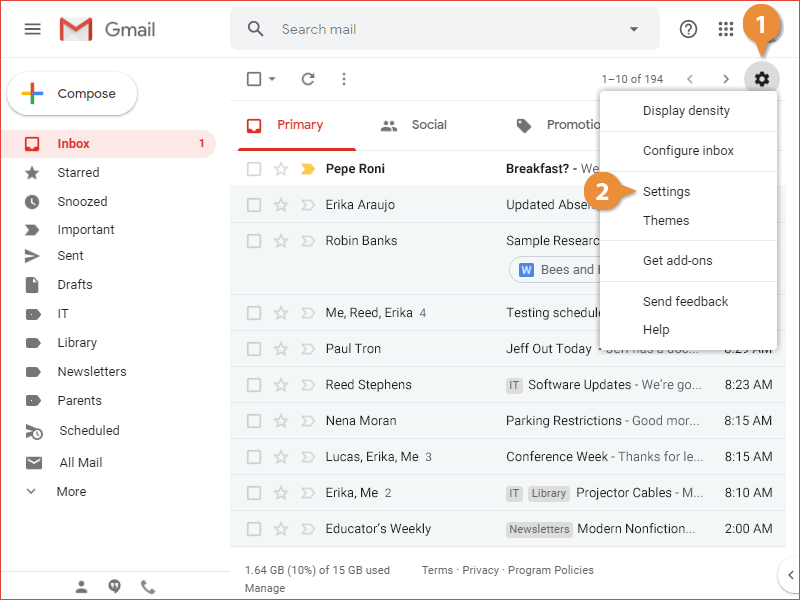
While Google hasn’t officially detailed every step, the expected process may look like:
- Go to Google Account Settings
- Navigate to Personal Info
- Select Email → Edit option
- Choose or enter a new Gmail address
- Verify identity
Note:
- Some restrictions may apply
- Not all usernames will be available
- Changes might be limited (e.g., once per year)
SEO Insight: What This Means for Businesses
This update also has implications for digital marketers:
Better Brand Consistency
Businesses can now maintain:
- One account
- Updated branding
Without losing data or access.
Improved Communication Trust
A professional email:
- Builds credibility
- Improves email open rates
- Enhances brand perception
Easier Funnel & CRM Management
For marketers using tools like:
- Email automation
- CRM systems
- Funnel platforms
A consistent email identity reduces confusion and improves tracking.
Potential Limitations
While the feature is exciting, there are still some considerations:
- Currently limited to US users
- Rollout may be gradual
- Some legacy accounts may not support changes
- Risk of phishing or impersonation concerns
With this update, Google is addressing one of Gmail’s oldest limitations. Allowing users to change their email address brings greater flexibility, better branding opportunities, and improved user experience.
If rolled out globally, this feature could become a game-changer for both individuals and businesses, making Gmail more adaptable to modern digital needs.
FAQs
1. Can I change my Gmail address now?
Currently, the feature is being tested for US users. A global rollout may happen soon.
2. Will I lose my emails after changing my address?
No, the update is designed to retain all your data, emails, and account history.
3. Can businesses benefit from this feature?
Yes, businesses can update their email identity without creating new accounts, improving branding and consistency.
4. Is there any limitation on changing Gmail addresses?
There may be restrictions such as availability of usernames and limits on how often changes can be made.